-e1750215042767.png)
-e1750215042767.png)
当 FDS 模拟启动时,有许多首选项可控制 PyroSim 创建的文件,从而影响结果 (PyroSim 3D 结果或 Smokeview)。
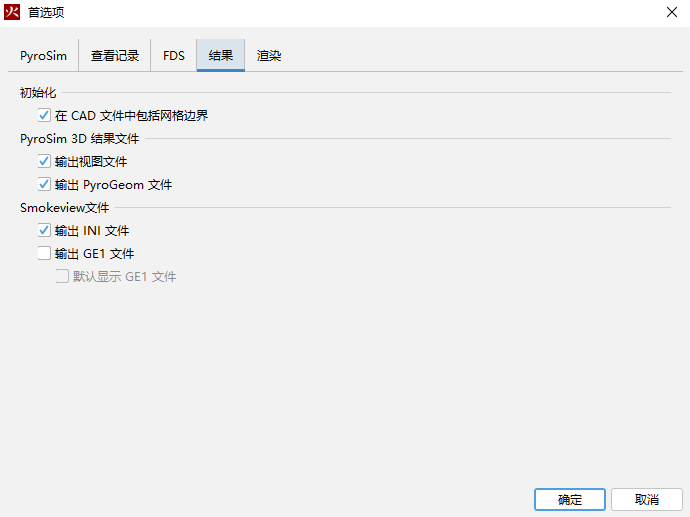
结果首选项
在 CAD 文件中包含网格边界:
是否在写入的任何 CAD 文件中包含网格的非开放边界。输出视图文件:是否输出以.views扩展名结尾的文件。该文件包含模型中所有视图的信息,并且只能由 PyroSim 3D 结果读取。启用视图文件可防止视图写入Smokeview INI 文件。
输出 PyroGeom 文件:
是否输出包含可在 PyroSim 3D 结果中查看的所有 CAD、障碍物和通风口几何形状的文件。该文件表示转换为 FDS 块之前的几何形状,并在 3D 结果中提供高质量的视觉效果。如果该文件中的对象具有与其关联的控制逻辑,则该文件中的对象也会正确设置动画(打开/关闭),这与 GE1 文件不同。
输出INI文件:
是否为Smokeview输出INI文件。该文件包含着色信息和一些初始化信息。如果未选中输出视图文件,它还包括 Smokeview 的视图信息。
输出GE1文件:
是否输出GE1文件。 GE1 文件与 PyroGeom 文件类似,其中包括块转换之前的CAD、障碍物和通风口几何形状。 虽然此文件格式可以在 PyroSim 3D Results 和Smokeview 中查看,但它有一些限制:·CAD纹理坐标可能无法正确映射。·具有控制逻辑的对象不具有动画效果。默认显示GE1文件是否在 Smokeview 中默认显示 GE1 文件,而不是捕捉的障碍物和通风口。仅当输出 INI 文件也被选中时才能使用此选项。